

Does anybody practice typing anymore? Readers of a certain age will recall when keyboard skills were still taught in schools, and students competed to keep their accuracy up while still hitting new words-per-minute records. These days, you can probably get text entered faster with voice input, or through Gboard’s glide typing gestures, but there’s still something enormously satisfying about just tapping away on a keyboard at blistering speeds. And today we’ve got a little Gboard feature to share with you that’s getting ready to celebrate just that.
An animation for the typing zone
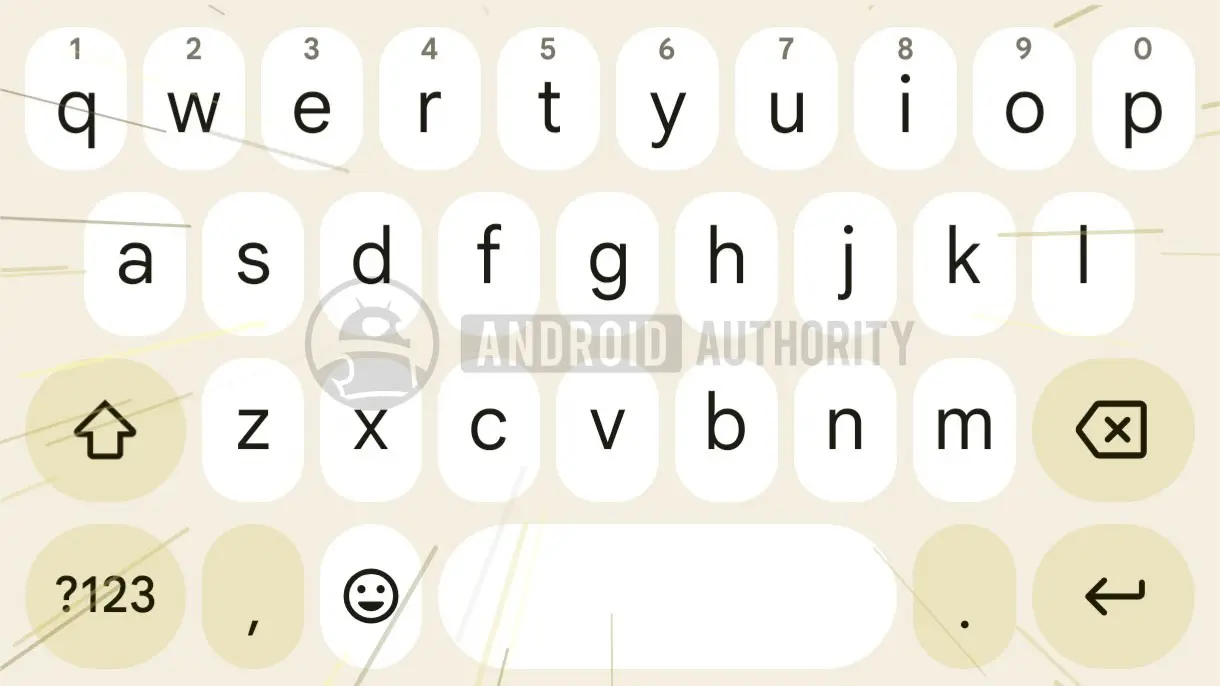
Anyone who has done enough text entry will know the experience of finding yourself “in the zone.” At some point, external distractions fade away, the keyboard begins feeling like just an extension of your hands, and the words flow out effortlessly. In version 18.0.3.954559732-beta-arm64-v8a of Gboard for Android, we see Google preparing a new animation that feels perfect for illustrating that experience. The effect is a set of moving lines that sweep across the keyboard, making it look as if the keys themselves are accelerating to warp speed. It’s a subtle but playful nod to the sheer velocity of your input.
How slick is that? When your input rises above Gboard’s threshold, the app will start showing those “zoom” lines to convey the overwhelming speed you’re typing at. The visual language is reminiscent of science-fiction hyperspace effects, where stars stretch into streaks as a spacecraft leaps to faster-than-light travel. Here, the keyboard becomes the starship, and your fingers are the ones pushing it past the limits of ordinary communication.
What we know so far
Right now, we don’t know much else about this effect — whether there will be an option to turn it on or off, exactly how fast you’ll need to go in order to activate it, nor whether Google’s planning any cute branding for it. The code strings and resource files found in the APK reveal only the existence of the animation itself, not the full implementation. It’s possible that the feature is still in early testing, and Google may adjust the behavior before a wider rollout.
One of the most interesting questions is the speed threshold. Google could set a relatively low bar, such as 60 words per minute, to make the animation attainable for many users. Or the company might reserve it for genuine speed demons who can sustain 80 or even 100 words per minute on a touchscreen. The latter would make the animation a kind of badge of honor, a way for Gboard to acknowledge your exceptional skill.
Another unknown is whether the animation will be enabled by default or buried in settings. Some users might find it distracting, especially if they often type quickly for long stretches. Others will likely welcome the feedback, as it turns every rapid typing session into a mini celebration. Google has a history of adding subtle, optional visual effects to its apps, so there’s a good chance a toggle will be provided.
The evolution of keyboard feedback
Gboard has long been one of the most feature-rich keyboards on Android, offering glide typing, voice dictation, emoji search, GIF integration, and even a built-in Google Search. But tactile and visual feedback has always been a tricky balancing act for mobile keyboards. Since touchscreens lack the physical keys of a typewriter or a mechanical keyboard, software keyboards must rely on sound, haptics, and animation to communicate with the user.
Google has experimented with various feedback mechanisms over the years, from adjustable haptic strength to themed key presses. The new hyperspeed animation is a natural extension of that philosophy: it uses real-time input data to create a dynamic, responsive visual. Rather than a static theme or a simple key pop, this effect reacts to your behavior, making the keyboard feel almost alive.
The idea of speed-based feedback is not entirely new. Some racing games and fitness apps use similar metaphors, where the interface changes as you push harder or move faster. But applying that concept to a keyboard is an unusual and creative move. It acknowledges that typing speed is not just a utilitarian metric; it’s also an emotional and physical experience. Fast typing can feel exhilarating, and Gboard may be trying to amplify that feeling.
A brief history of typing speed
The quest for faster typing is almost as old as the typewriter itself. In the late 19th century, courts began using stenography machines to keep up with rapid speech, and secretaries competed to reach ever higher words-per-minute counts. By the mid-20th century, typing classes were a staple of American high schools, and students practiced on electric typewriters with precision drills. The standard for professional typists was often 60 to 80 words per minute, with accuracy rates above 95%.
The personal computer revolution shifted typing from a specialized occupation to a universal skill. The rise of email, instant messaging, and social media made typing a daily activity for billions of people. Yet the physical keyboard remained largely unchanged for decades. It wasn’t until smartphones popularized touchscreen keyboards that typing had to reinvent itself. Predictive text, autocorrect, and swipe gestures reduced the need for precise key presses, but they also changed the nature of the skill. Some users now type faster by gliding their fingers across the glass than by tapping individual keys.
Gboard’s glide typing, known as swipe typing, is a prime example. Instead of lifting your finger between letters, you trace a path from one key to the next, and the keyboard’s algorithms decode the intended word. This can be significantly faster than tapping, especially for longer words. Combined with the new hyperspeed animation, it could create a particularly satisfying experience for swipe typists, who often achieve very high input speeds.
The psychology of “being in the zone”
The concept of “flow” was popularized by psychologist Mihaly Csikszentmihalyi, who described it as a state of complete immersion in an activity. Typing at high speed is an ideal flow activity for many people. The repetitive motions, the immediate feedback, and the clear goal of transforming thoughts into text create a tight feedback loop. When you’re in the zone, you’re not thinking about individual keystrokes; you’re simply channeling ideas through your fingers.
An animation that acknowledges this state could reinforce the flow experience. By making the keyboard visually celebrate your speed, Gboard is providing positive reinforcement. This is similar to the way fitness apps congratulate you for reaching a new personal best, or how language learning apps reward streaks. The hope is that the animation will not only delight users, but also encourage them to type faster and more fluidly over time.
Of course, there’s a potential downside. If the animation is too distracting, it could break the very flow it’s meant to celebrate. A rapid burst of moving lines might draw your attention away from the text you’re composing, causing mistakes. Google will need to strike a careful balance between visual flair and functional utility. The fact that the animation only appears when typing is already fast may suggest that Google is aware of this risk, since faster typists are often more capable of handling interruptions.
What an APK teardown can and cannot tell us
The discovery of this animation comes from an APK teardown, a process that involves decompiling an app’s installation package to inspect its resources and code. While teardowns can reveal upcoming features, they are not guarantees. Features found in a beta or even a stable APK may be removed, delayed, or heavily altered before release. Google frequently experiments with new ideas that never see the light of day.
That being said, Gboard’s development cycle is typically quite transparent. Many features that appear in beta versions eventually roll out to all users, sometimes with new names or options. The hyperspeed animation, if it reaches the stable version, would likely be part of a larger Gboard update. It might be accompanied by improvements to autocorrect, haptics, or UI customization. It could also be tied to specific Android versions, as visual effects often require the latest GPU and rendering capabilities.
For now, we can only speculate. The resource files in the APK show a set of line drawables and a timing mechanism, but not the exact conditions for triggering the animation. It’s possible that the threshold is measurable in characters per minute, words per minute, or even inter-keypress intervals. Google may also choose to adapt the animation based on the typing speed, with more intense effects at higher speeds.
How Gboard compares to other keyboards
Google’s main competitors in the mobile keyboard space include Samsung’s keyboard, Microsoft’s SwiftKey, and Apple’s built-in iOS keyboard. Each has its own unique features, but none have implemented a speed-based animation like the one spotted in Gboard. SwiftKey, for example, has long offered a sleek, modern design and robust autocorrection, but its visual feedback is relatively static. Samsung’s keyboard includes a variety of themes and key effects, but those are manual selections, not reactive animations.
The lack of a comparable feature elsewhere could give Gboard a distinctive edge. Typing is such a fundamental activity that even a small embellishment can make a big difference in user enjoyment. Many phone manufacturers are focusing on camera and display technology, but the keyboard is the interface users interact with most. Adding a fun, hidden reward for fast typing could strengthen user loyalty and even motivate some people to practice their typing skills.
What’s next for Gboard’s animation
As with any speculative story, we need to temper our excitement. The animation might be disabled in the final version or require a device setting to enable. It’s also possible that the feature is intended for unaided typing only, and will deliberately ignore glide typing. And, of course, some Gboard users never type fast enough to trigger the effect, so they may never see it at all.
Still, the very existence of the animation shows that Google is thinking creatively about how to make mundane tasks more enjoyable. In a world where artificial intelligence is increasingly capable of generating text for us, the act of manually typing is becoming more personal, more deliberate. Celebrating that act with a little visual flourish is a refreshing counterpoint to the trend toward automation.
All we know for sure is that it looks very cool, and that it’s making us feel just that much more self-conscious about our abysmal touch-input typing speeds. Time to start practicing!
Source:Android Authority News